Data Management (2025 updated for metacat/justIN/rucio)
Overview
Teaching: 30 min
Exercises: 15 minQuestions
What are the data management tools and software for DUNE?
Objectives
Learn how to access data from DUNE Data Catalog.
Learn a bit about the justIN workflow system for submitting batch jobs.
Table of Contents for 03-data-management
- Session Video - Live Notes
- Introduction
- How to find and access official data
- Official datasets
- What is metacat?
- Find a file in metacat
- Example of doing a metacat search
- then do queries to find particular groups of files
- What do those fields mean?
- find out how much raw data there is in a run using the summary option
- get a limited number of files in a query
- find out how much data there is in a dataset
- What describes a dataset?
- What files are in that dataset and how do I use them?
- Getting file locations using Rucio
- Quiz
- Useful links to bookmark
Workshop Data Search Video from September 2026
Link to Full Unicamp 2026 Video Playlist
Session materials associated with Dr. Higuero’s Data Search presentation can be found on Indico 75882.
Archive of an earlier version of a data management training: DUNE Computing Tutorial Dec 2024 Data Management
Introduction
What we need to do to produce accurate physics results
DUNE has a lot of data which is processed through a complicated chain of steps. We try to abide by FAIR (Findable, Accesible, Intepretable and Reproducible) principles in our use of data.
Our DUNE Physics Analysis Review Procedures state that:
-
Software must be documented, and committed to a repository accessible to the collaboration.
The preferred location is any repository managed within the official DUNE GitHub page: https://github.com/DUNE.
There should be sufficient instructions on how to reproduce the results included with the software. In particular, a good goal is that the working group conveners are able to remake plots, in case cosmetic changes need to be made. Software repositories should adhere to licensing and copyright guidelines detailed in DocDB-27141.
-
Data and simulation samples must come from well-documented, reproducible production campaigns. For most analyses, input samples should be official, catalogued DUNE productions.
How we do it ?
DUNE offical data samples are produced using released code, cataloged with metadata that describes the processing chain and stored so that they are accessible to collaborators.
DUNE data is stored around the world and you cannot directly log into most of the systems. For this purpose we use the metacat data catalog to describe the data and collections and the rucio file storage system to determine where replicas of files are and provide a url that allows you to process them. There is also a legacy SAM data access system that can be used for older files.
There are currently > 27M files cataloged in metacat with a total size of > 48 PB.
Key ideas:
-
Official datasets are groups of files already defined for you. Ask your physics group for pointers. Otherwise you can browse the data yourself using the generic
metacatandruciotools. metacattells us what the file is and how it was made, with what software.ruciotells us where the file is, and gets it and keeps it where it is supposed to be.
All rucio entries should have a metacat entry describing them. With a few exceptions (retired, intermediate files), metacat entries correspond to real files in rucio.
How do I use this.
If you want to access data, this module will help you find and examine it.
If you want to process data using the full power of DUNE computing, you should talk to the data management group about methods for cataloging any data files you plan to produce. This will allow you to use DUNE’s collaborative storage capabilities to preserve and share your work with others and will be required for publication of results.
How to find and access official data
Official datasets
The production group make official datasets which are sets of files which share important characteristics such as experiment, data_tier, data_stream, processing version and processing configuration. Often all you need is an official dataset.
See DUNE Physics Datasets for a detailed description.
Fast web catalog queries
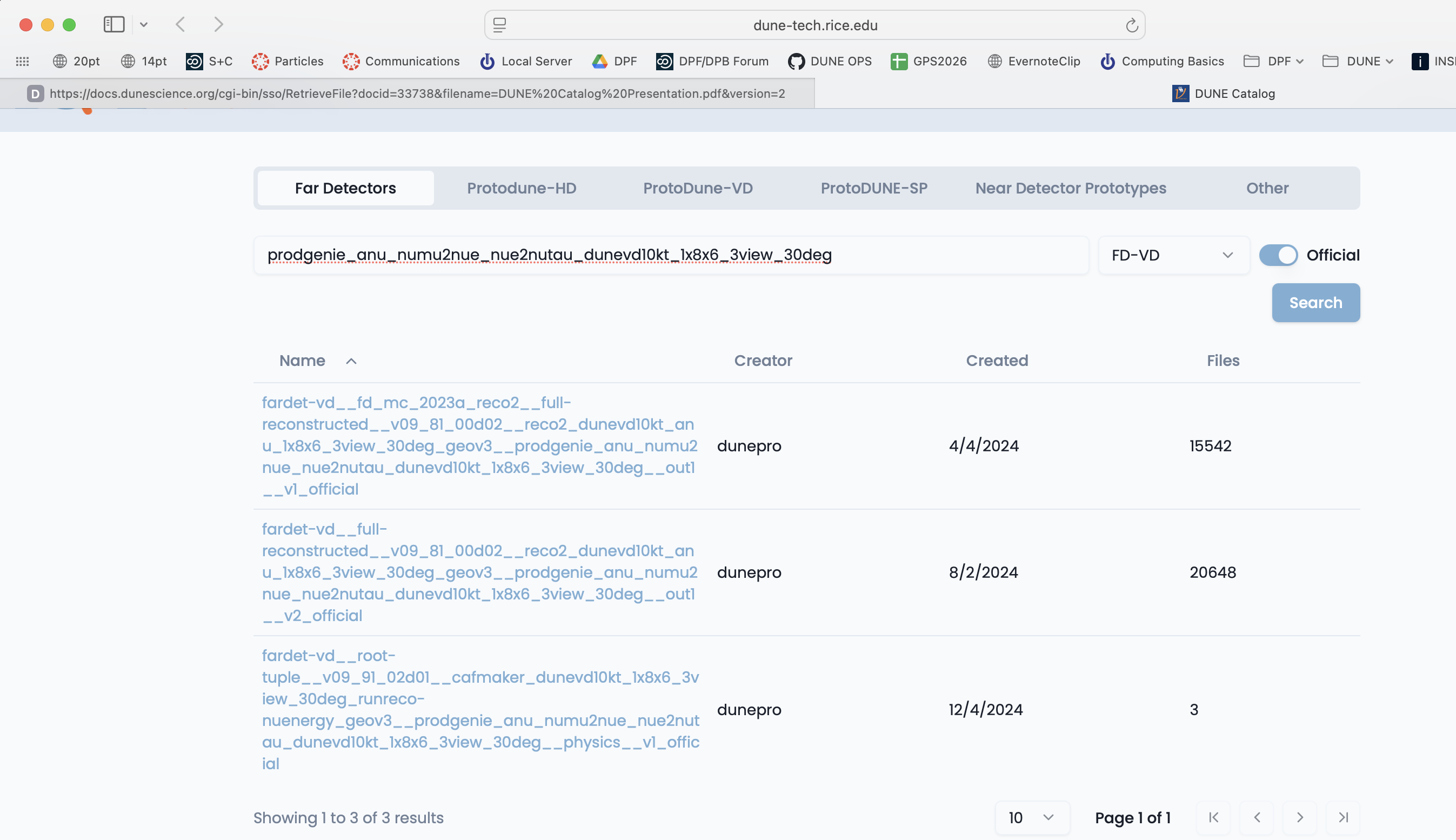
Go to dunecatalog and log in with your services password. This web application gives DUNE collaborators a single browser-based interface for searching, browsing, and inspecting the experiment’s data. From here you can access the files in a given dataset, view file metadata, check Rucio replica information, and trace file provenance — all in the browser.
Choose your apparatus (Far Detector for example), use the category key to further refine your search and then type in keywords. Here I chose the Far Detectors tab and the FD-VD category from the pulldown menu.
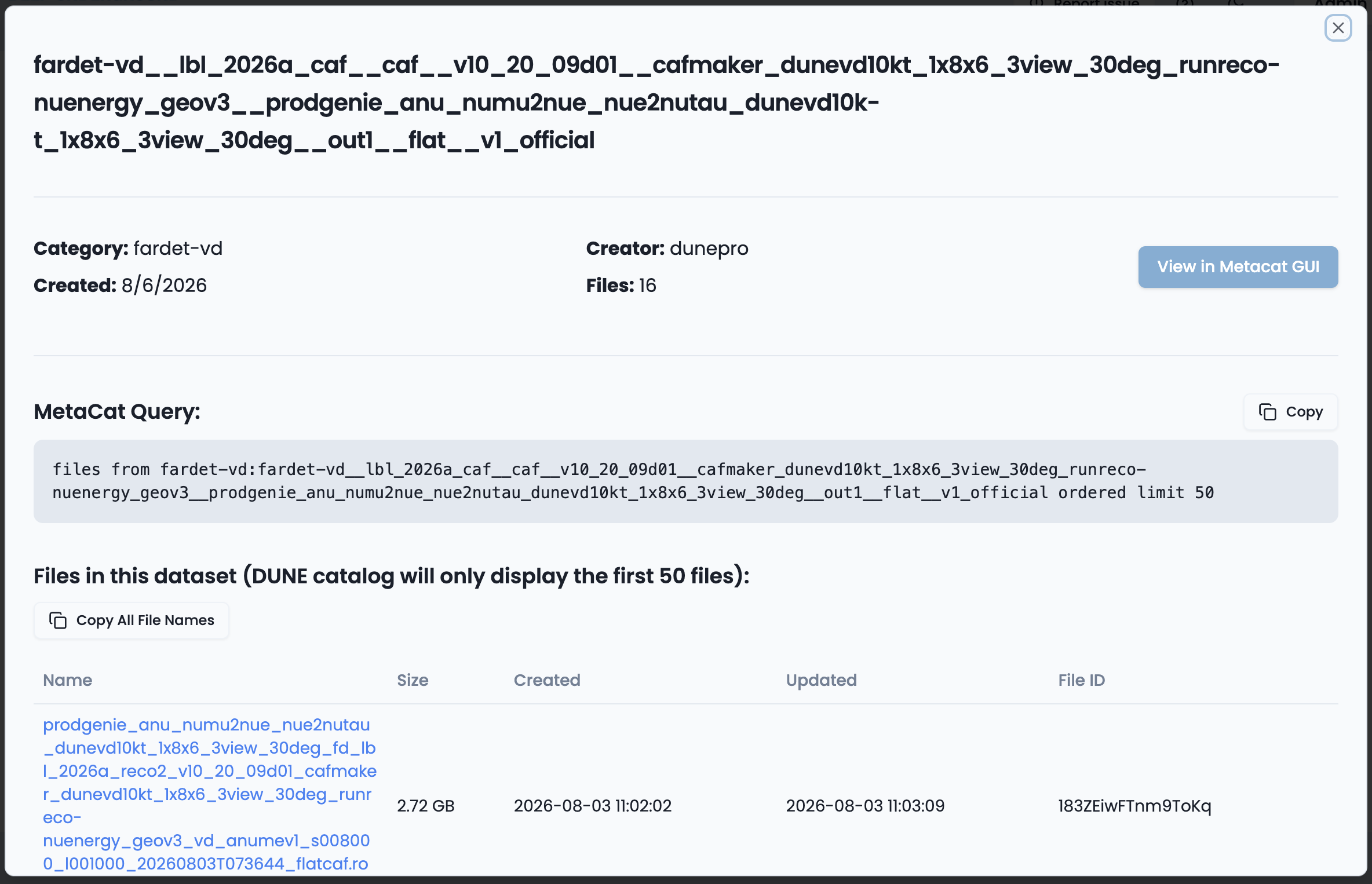
If you click on a dataset you can see a sample of the files inside it.
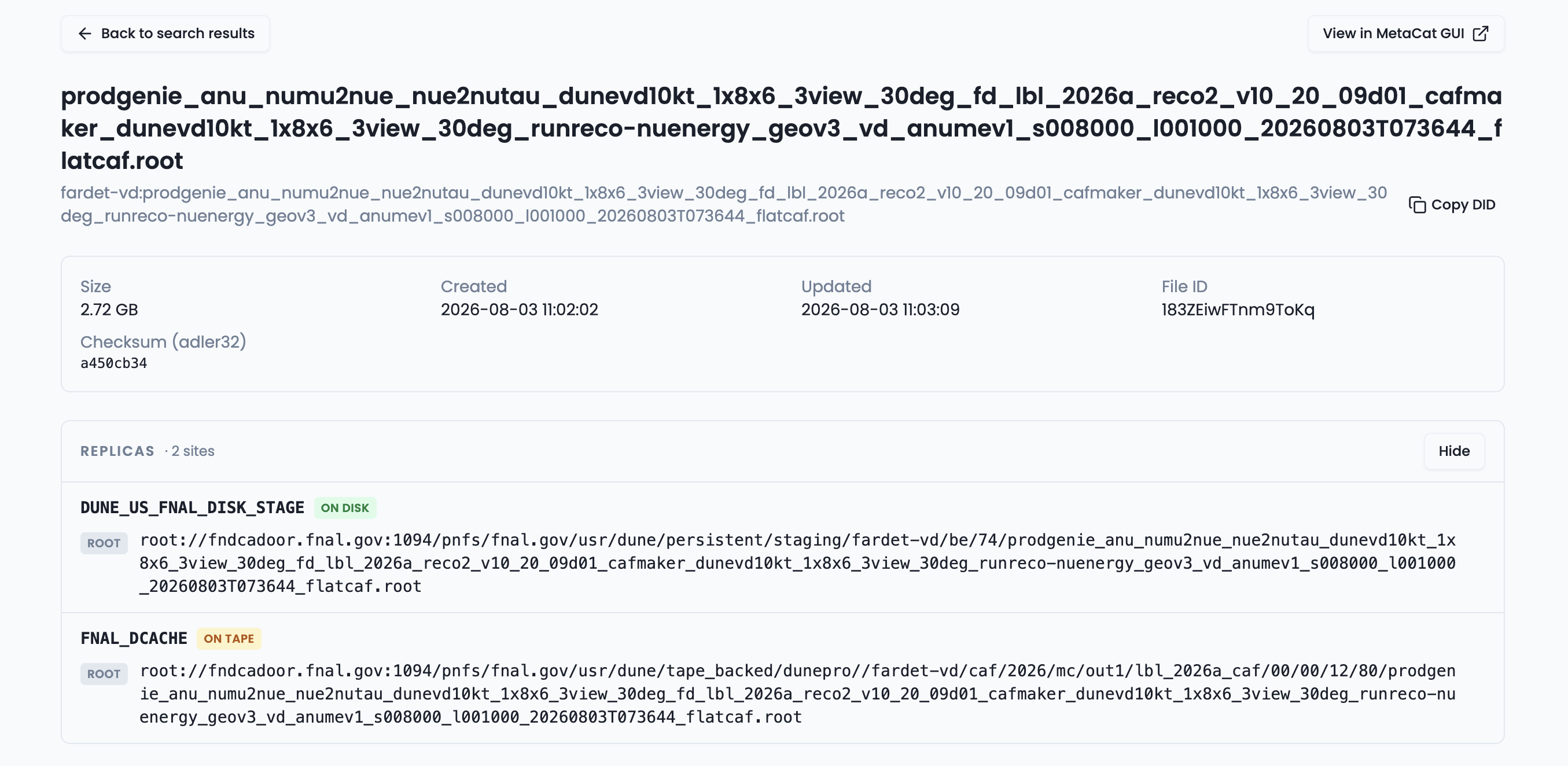
Scan the file list and click a file name — every file name is a link to that file’s own detail page. There you can view the file’s Rucio replica info, metadata, and provenance, with one-click copy of the Rucio replica info for use in scripts and other tools. NOTE: Allow pop-up windows. To retrieve the Rucio replica info you’ll need to authenticate once.
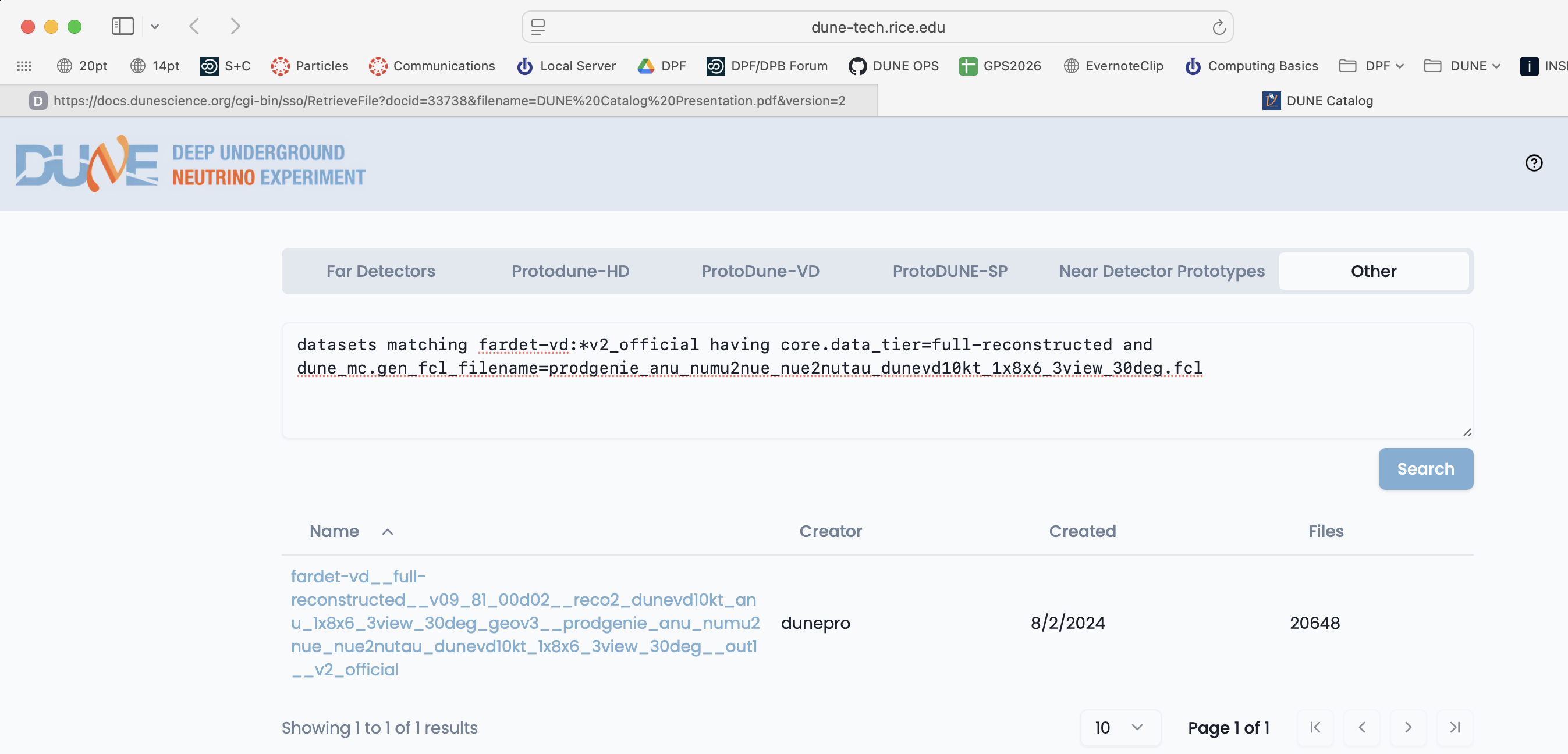
You can use the web data catalog to do advanced searches
You can run advanced searches from the Other tab in the web-based Data Catalog. This includes any MQL query with native wildcard syntax, as well as queries to the conditions DB (ProtoDUNE-HD and VD) — where you can search by run, by momentum, or by start/stop date.
You can find a more detailed tutorial for the dunecatalog site at: Dune Catalog Tutorial
Command line tools and advanced queries
You can also explore and find the right dataset on the command line by using metacat dataset keys:
First you need to know your namespace and then explore within it.
metacat namespace list # find likely namespaces
There are official looking ones like hd-protodune-det-reco and ones for users doing production testing like schellma. The default for general use is usertests
Creation of namespaces by non-privileged users is currently disabled. A tool is in progress which will automatically make one namespace for each user
metacat web interface
Metacat also has a web interface that is useful in exploring file parentage metacat gui
Example of finding reconstructed Monte Carlo
Let’s look for some reconstructed Monte Carlo from the VD far detector.
metacat query "datasets matching fardet-vd:*official having core.data_tier=full-reconstructed"
Lots of output … looks like there are 2 types of official ones - let’s get “v2”
metacat query "datasets matching fardet-vd:*v2_official having core.data_tier=full-reconstructed"
and there are then several different generators. Let’s explore reconstructed simulation of the vertical drift far detector.
metacat query "datasets matching fardet-vd:*v2_official having core.data_tier=full-reconstructed and dune_mc.gen_fcl_filename=prodgenie_nu_numu2nue_nue2nutau_dunevd10kt_1x8x6_3view_30deg.fcl"
Ok, found the official neutrino beam dataset:
fardet-vd:fardet-vd__full-reconstructed__v09_81_00d02__reco2_dunevd10kt_nu_1x8x6_3view_30deg_geov3__prodgenie_nu_numu2nue_nue2nutau_dunevd10kt_1x8x6_3view_30deg__out1__v2_official
metacat query "datasets matching fardet-vd:*v2_official having core.data_tier=full-reconstructed and dune_mc.gen_fcl_filename=prodgenie_anu_numu2nue_nue2nutau_dunevd10kt_1x8x6_3view_30deg.fcl"
And the anti-neutrino dataset:
fardet-vd:fardet-vd__full-reconstructed__v09_81_00d02__reco2_dunevd10kt_anu_1x8x6_3view_30deg_geov3__prodgenie_anu_numu2nue_nue2nutau_dunevd10kt_1x8x6_3view_30deg__out1__v2_official
You can also query the catalogs yourself using metacat and rucio catalogs. Metacat contains information about file content and official datasets, rucio stores the physical location of those files. Files should have entries in both catalogs. Generally you ask metacat first to find the files you want and then ask rucio for their location.
What is metacat?
Metacat is a file and dataset catalog - it allows you to search for files and datasets that have particular attributes and understand their provenance, including details on all of their processing steps. It also allows for querying jointly the file catalog and the DUNE conditions database.
You can find extensive documentation on metacat at:
Find a file in metacat
DUNE runs multiple experiments (far detectors, protodune-sp, protodune-dp hd-protodune, vd-protodune, iceberg, coldboxes… ) and produces various kinds of data (mc/detector) and process them through different phases.
To find your data you need to specify at the minimum
core.run_type(the experiment: fardet-vd, hd-protodune …)core.file_type(mc or detector)core.data_tier(the level of processing raw, full-reconstructed, root-tuple …)
and when searching for specific types of data
core.data_stream(physics, calibration, cosmics)core.runs[any]=<runnumber>
For processed data you also need to know about
core.application.version(version of code run)dune.config_file(configuration file for the reconstruction/simulation)dune_mc.gen_fcl_filename(configuration for the initial simulation physics)dune.output_status(This should be ‘confirmed’ for processed files. If it is not, the file likely never got stored.)core.data_tier(what kind of output is it?)
Example of doing a metacat search
Here is an example of a metacat query that gets you raw files from a recent ‘hd-protodune’ cosmics run.
First set up metacat if you have not already done so
Choose your OS
SL7
Make certain you have dune software set up SL7 setup
setup metacat
setup rucio
AL9
Make certain you have AL9 set up AL9 setup
metacatandrucioare part of the default spack setup
then do queries to find particular groups of files
metacat query "files from dune:all where core.file_type=detector and core.run_type=hd-protodune and core.data_tier=raw and core.runs[any]=27331 ordered limit 1"
this should give you a file:
hd-protodune:np04hd_raw_run027331_0254_dataflow0_datawriter_0_20240620T173408.hdf5
the string before the ‘:’ is the namespace and the string after is the filename.
You can find out more about your file by doing:
metacat file show -m -l hd-protodune:np04hd_raw_run027331_0254_dataflow0_datawriter_0_20240620T173408.hdf5
which gives you a lot of information:
checksums:
    adler32   : 5222f2ae
created_timestamp   :	2024-06-20 17:38:45.141418+00:00
creator             :	dunepro
fid                 :	83316551
name                :	np04hd_raw_run027331_0254_dataflow0_datawriter_0_20240620T173408.hdf5
namespace           :	hd-protodune
size                :	4238541524
updated_timestamp   :	1718905125.141418
metadata:
    core.data_stream    : physics
    core.data_tier      : raw
    core.end_time       : 1718904863.0
    core.event_count    : 35
    core.events         : [35564, 35568, 35572, 35576, 35580, 35584, 35588, 35592, 35596, 35600, 35604, 35608, 35612, 35616, 35620, 35624, 35628, 35632, 35636, 35640, 35644, 35648, 35652, 35656, 35660, 35664, 35668, 35672, 35676, 35680, 35684, 35688, 35692, 35696, 35700]
    core.file_content_status: good
    core.file_format    : hdf5
    core.file_type      : detector
    core.first_event_number: 35564
    core.last_event_number: 35700
    core.run_type       : hd-protodune
    core.runs           : [27331]
    core.runs_subruns   : [2733100001]
    core.start_time     : 1718904848.0
    dune.daq_test       : False
    retention.class     : physics
    retention.status    : active
children:
   hd-protodune-det-reco:np04hd_run27331_calibana_merged_1.root (cl7b7XQpTpS3PGm5)
   hd-protodune-det-reco:np04hd_raw_run027331_0254_dataflow0_datawriter_0_20240620T173408_reco_stage1_reco_stage2_20240926T225231_keepup_hists.root (Kf6CttcJRJu2uk58)
   hd-protodune-det-reco:np04hd_raw_run027331_0254_dataflow0_datawriter_0_20240620T173408_reco_stage1_reco_stage2_20240926T225231_keepup.root (sxh5FHKLTGym6pDp)
   hd-protodune-det-reco:np04hd_raw_run027331_0254_dataflow0_datawriter_0_20240620T173408_reco_stage1_reco_stage2_20240623T013207_keepup.root (Xl9QXEo0RouAqO0s)
   hd-protodune-det-reco:np04hd_raw_run027331_0254_dataflow0_datawriter_0_20240620T173408_reco_stage1_20240623T013207_keepup_hists.root (xWIH9tmnSWqWBJE5)
What do those fields mean?
look in the glossary to see what those fields mean.
Warning - there are multiple child files that look similar
Files can be reprocessed with different versions and can be reprocessesd twice if the batch system gets confused. Experts can tell them apart with specific queries about reconstruction versions and file status (in this case there were 2 reconstruction versions core.application.version = v09_90_02d00 and v09_91_02d01).
If you are doing real analysis please use the official datasets which experts have defined
if no official dataset exists, you need to require additional fields like:
dune.output_status=confirmedandcore.application.version=v09_91_02d01anddune.config_file=standard_reco_stage2_calibration_protodunehd_keepup.fclto make certain that the job that created the file actually wrote the output back to storage and you are not looking at 2 versions of the same file.
find out how much raw data there is in a run using the summary option
metacat query -s "files from dune:all where core.file_type=detector \
 and core.run_type=hd-protodune and core.data_tier=raw \
 and core.data_stream=physics and core.runs[any]=27331"
Files:        4144
Total size:   17553648200600 (17.554 TB)
get a limited number of files in a query
Batch workflows with more than 10,000 files are strongly discouraged (largely as when they fail, they fail BIG!). You can chop up larger sets by using the skip and limit fields in your query.
To chop up a big query into smaller chunks:
export MYBIGQUERY=<your query>
export MYQUERY1="$MYBIGQUERY ordered skip 0 limit 1000"
export MYQUERY2="$MYBIGQUERY ordered skip 1000 limit 1000"
export MYQUERY3="$MYBIGQUERY ordered skip 2000 limit 1000"
..etc.
-
the
orderedassures that your query is reproducible -
the
skipneeds to appear before thelimit
Always look at the output of your workflow on one of the queries before submitting them all.
find out how much data there is in a dataset
Do a query of a dataset using the -s or --summary option
metacat query -s "files from fardet-vd:fardet-vd__full-reconstructed__v09_81_00d02__reco2_dunevd10kt_anu_1x8x6_3view_30deg_geov3__prodgenie_anu_numu2nue_nue2nutau_dunevd10kt_1x8x6_3view_30deg__out1__v2_official"
Files:        20648
Total size:   34550167782531 (34.550 TB)
this may take a while as that is a big dataset.
What describes a dataset?
Let’s look at the metadata describing an anti-neutrino dataset: the -j means json output
metacat dataset show -j fardet-vd:fardet-vd__full-reconstructed__v09_81_00d02__reco2_dunevd10kt_anu_1x8x6_3view_30deg_geov3__prodgenie_anu_numu2nue_nue2nutau_dunevd10kt_1x8x6_3view_30deg__out1__v2_official
{
    "created_timestamp": 1722620726.662696,
    "creator": "dunepro",
    "description": "files where namespace='fardet-vd' and core.application.version=v09_81_00d02 and core.application.name=reco2 and core.data_stream=out1 and core.data_tier='full-reconstructed' and core.file_type=mc and core.run_type='fardet-vd' and dune.campaign=fd_mc_2023a_reco2 and dune.config_file=reco2_dunevd10kt_anu_1x8x6_3view_30deg_geov3.fcl and dune.requestid=ritm1780305 and dune_mc.detector_type='fardet-vd' and dune_mc.gen_fcl_filename=prodgenie_anu_numu2nue_nue2nutau_dunevd10kt_1x8x6_3view_30deg.fcl and dune.output_status=confirmed and core.group=dune",
    "file_count": 20648,
    "file_meta_requirements": {},
    "frozen": true,
    "metadata": {
        "core.application.name": "reco2",
        "core.application.version": "v09_81_00d02",
        "core.data_stream": "out1",
        "core.data_tier": "full-reconstructed",
        "core.file_type": "mc",
        "core.group": "dune",
        "core.run_type": "fardet-vd",
        "datasetpar.deftag": "v2_official",
        "datasetpar.max_time": null,
        "datasetpar.min_time": null,
        "datasetpar.namespace": "fardet-vd",
        "dune.campaign": "fd_mc_2023a_reco2",
        "dune.config_file": "reco2_dunevd10kt_anu_1x8x6_3view_30deg_geov3.fcl",
        "dune.output_status": "confirmed",
        "dune.requestid": "ritm1780305",
        "dune_mc.detector_type": "fardet-vd",
        "dune_mc.gen_fcl_filename": "prodgenie_anu_numu2nue_nue2nutau_dunevd10kt_1x8x6_3view_30deg.fcl"
    },
    "monotonic": false,
    "name": "fardet-vd__full-reconstructed__v09_81_00d02__reco2_dunevd10kt_anu_1x8x6_3view_30deg_geov3__prodgenie_anu_numu2nue_nue2nutau_dunevd10kt_1x8x6_3view_30deg__out1__v2_official",
    "namespace": "fardet-vd",
    "updated_by": null,
    "updated_timestamp": null
}
You can use any of those keys to refine dataset searches as we did above. You probably have to ask your physics group which are interesting.
What files are in that dataset and how do I use them?
You can either locate and click on a dataset in the web data catalog or use the metacat web interface or use the command line:
metacat query "files from fardet-vd:fardet-vd__full-reconstructed__v09_81_00d02__reco2_dunevd10kt_anu_1x8x6_3view_30deg_geov3__prodgenie_anu_numu2nue_nue2nutau_dunevd10kt_1x8x6_3view_30deg__out1__v2_official ordered limit 10"
will list the first 10 files in that dataset (you probably don’t want to list all 20648)
You can also use a similar query in your batch job to get the files you want.
Getting file locations using Rucio
To find the physical location of your files, you need to use Rucio directly or give the justIN batch system your metacat query and it will locate them for you.
What is Rucio?
rucio is the next-generation Data Replica service and is part of DUNE’s new Distributed Data Management (DDM) system that is currently in deployment.
Rucio has two functions:
- A rule-based system to get files to Rucio Storage Elements around the world and keep them there.
- To return the “nearest” replica of any data file for use either in interactive or batch file use. It is expected that most DUNE users will not be regularly using direct Rucio commands, but other wrapper scripts that calls them indirectly.
As of the date of the 2026 tutorial:
- The
rucioclient is available in CVMFS and Spack - Most DUNE users are now enabled to use it. New users may not automatically be added.
Authenticate
You may need to redo this as tokens expire. The first time it will ask you to open a web browser, authenticate and enter the long string it delivers to you.
justin time
justin get-token
finding a file
Then use rucio to find out about a file’s locations. the –protocols flag makes certain you get the streaming root: location.
rucio replica list file fardet-vd:prodmarley_nue_es_flat_radiological_decay0_dunevd10kt_1x8x14_3view_30deg_20250217T033222Z_gen_004122_supernova_g4stage1_g4stage2_detsim_reco.root --pfns --protocols=root
returns 2 locations:
root://fndca1.fnal.gov:1094/pnfs/fnal.gov/usr/dune/tape_backed/dunepro//fardet-vd/hit-reconstructed/2025/mc/out1/le_mc_2024a/00/00/51/85/prodmarley_nue_es_flat_radiological_decay0_dunevd10kt_1x8x14_3view_30deg_20250217T033222Z_gen_004122_supernova_g4stage1_g4stage2_detsim_reco.root
root://meitner.tier2.hep.manchester.ac.uk:1094//cephfs/experiments/dune/RSE/fardet-vd/fd/a6/prodmarley_nue_es_flat_radiological_decay0_dunevd10kt_1x8x14_3view_30deg_20250217T033222Z_gen_004122_supernova_g4stage1_g4stage2_detsim_reco.root
which the locations of the file on disk and tape. We can use this to copy the file to our local disk or access the file via xroot.
Testing - access a file
Try to access the file at manchester using the command:
root -l root://meitner.tier2.hep.manchester.ac.uk:1094//cephfs/experiments/dune/RSE/fardet-vd/fd/a6/prodmarley_nue_es_flat_radiological_decay0_dunevd10kt_1x8x14_3view_30deg_20250217T033222Z_gen_004122_supernova_g4stage1_g4stage2_detsim_reco.root
_file0->ls()
It will complain because you haven’t loaded all the information needed to read an artroot file but you should be able to read it.
NOTE if you see a path in
/pnfs/usr/dune/tape_backedat Fermilab or oneosctapublic.cern.chthose are on tape and not generally accessible to the user. Try to get the file from the remaining one (in this case hep.manchester.ac.uk)
Reminder - Accessing data for use in your analysis, do not use NFS links
To access data without copying it,
XRootDis the tool to use. However it will work only if the file is staged to the disk. You can stream files worldwide if you have a DUNE VO certificate as described in the preparation part of this tutorial.
To learn more about using Rucio and Metacat to run over large data samples go here:
Full justIN/Rucio/Metacat Tutorial
Exercise 1
- Use
metacat query ....to find a file from a particular experiment/run/processing stage. Look in DataCatalogDocs for hints on constructing queries.- Use
metacat file show -m -l namespace:filenameto get metadata for this file. Note that--jsongives the output in json format.
When we are analyzing large numbers of files in a group of batch jobs, we use a metacat dataset to describe the full set of files that we are going to analyze and use the JustIn system to run over that dataset. Each job will then come up and ask metacat and rucio to give it the next file in the list. It will try to find the nearest copy. For instance if you are running at CERN and analyzing this file it will automatically take it from the CERN storage space EOS.
Exercise 2 - explore in the gui
The Metacat Gui is a nice place to explore the data we have.
You need to log in with your services (not kerberos) password.
do a datasets search of all namespaces for the word official in a dataset name
you can then click on sets to see what they contain
Exercise 3 - explore a dataset
Use metacat to find information about the dataset justin-tutorial:justin-tutorial-2024 How many files are in it, what is the total size. (metacat dataset show command, and metacat dataset files command) Use rucio to find one of the files in it.
Resources:
Quiz
Question 01
What is file metadata?
- Information about how and when a file was made
- Information about what type of data the file contains
- Conditions such as liquid argon temperature while the file was being written
- Both A and B
- All of the above
Answer
The correct answer is D - Both A and B.
Comment here
Question 02
How do we determine a DUNE data file location?
- Do `ls -R` on /pnfs/dune and grep
- Use `rucio replica list file` (namespace:filename) --pnfs --protocols=root
- Ask the data management group
- None of the Above
Answer
The correct answer is B - use
rucio replica list file(namespace:filename).Comment here
Useful links to bookmark
- DataCatalog: https://dune.github.io/DataCatalogDocs
- metacat: [https://dune.github.io/DataCatalogDocs/]
- rucio: [https://rucio.github.io/documentation/]
- Pre-2024 Official dataset definitions: dune-data.fnal.gov
- UPS reference manual
- UPS documentation (redmine)
- UPS qualifiers: About Qualifiers (redmine)
- mrb reference guide (redmine)
- CVMFS on DUNE wiki: Access files in CVMFS
Key Points
SAM and Rucio are data handling systems used by the DUNE collaboration to retrieve data.
Staging is a necessary step to make sure files are on disk in dCache (as opposed to only on tape).
Xrootd allows user to stream data files.